WhatsApp Plus DND Mode and Stealth Features Disappear Without Leaving
We all need a break from constant pings. Sometimes you want to finish a task, sit through dinner, or sleep without your phone buzzing every four minutes. The usual options are bad ones, since uninstalling is drastic and silencing your whole phone means missing calls that matter.
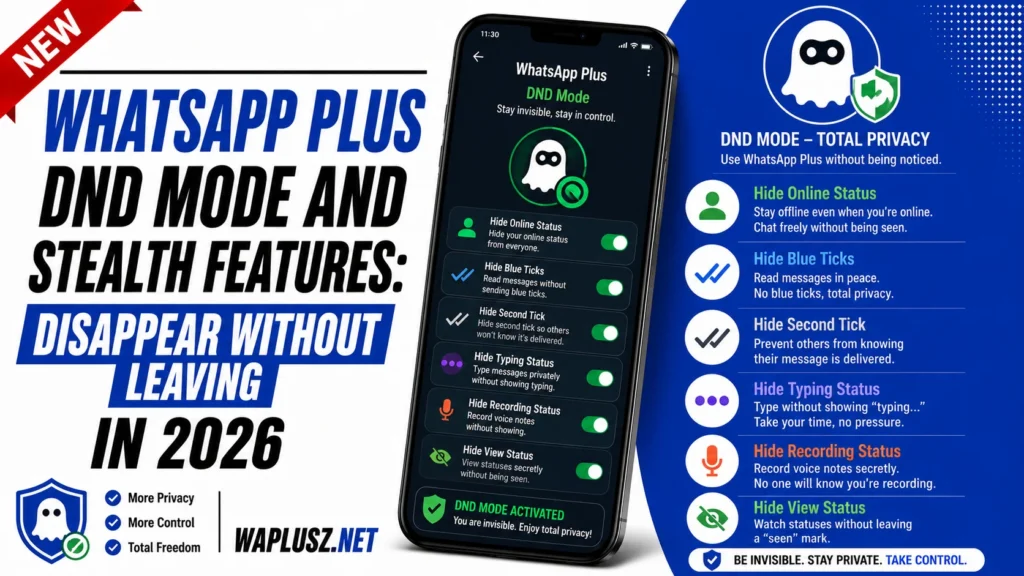
WhatsApp Plus has a middle path. DND mode cuts the app off from your attention without touching anything else, and the stealth features let you be present without being visible. This guide covers both.
What Is DND Mode?
DND mode in WhatsApp Plus blocks the app’s internet access with a single tap. Messages don’t arrive, notifications don’t fire, and the app goes completely quiet. Everything else on your phone keeps working normally.
It’s different from your phone’s Do Not Disturb, which silences everything at once. This one targets a single app, so your calls, alarms, and other messages come through untouched.
The effect is like uninstalling for an hour without any of the consequences. Turn it off and everything arrives at once.
Why It Beats the Alternatives
| Method | What It Silences | What You Lose |
|---|---|---|
| WhatsApp Plus DND | Only this app | Nothing else |
| Phone-wide DND | Everything | Calls, alarms, other apps |
| Airplane mode | All connectivity | Your entire phone |
| Turning off notifications | Alerts only | Messages still arrive and pile up |
| Uninstalling the app | Everything | Your setup, and you have to reinstall |
| Muting each chat | One chat at a time | Time, and you’ll miss one |
The row that matters is the fourth. Turning off notifications doesn’t stop messages arriving, which means you still open the app to forty unread chats and the mental load never went anywhere. DND stops delivery, so nothing accumulates until you choose.
How to Turn On DND Mode
The toggle is deliberately quick, since a feature you have to hunt for is one you won’t use.
- Open WhatsApp Plus and look at the home screen for a DND icon.
- Tap it once to cut the app’s connection.
- Check the indicator confirms it’s active, usually a changed icon or a small banner.
- Carry on with your day while nothing arrives.
- Tap it again to reconnect when you’re ready.
Some builds put the toggle in the three-dot menu instead of the home screen. Others let you set a timer so it switches itself off after an hour.
If your build has the timer, use it. The most common DND mistake is forgetting it’s on and wondering why nobody’s messaged you all afternoon.
When DND Mode Actually Helps
- Deep work sessions: An hour of writing or coding without a single interruption.
- Study blocks: The same, and it works better than willpower.
- Meals and family time: Present without the phone pulling at you.
- Sleep: No 2am group chat waking you up.
- Driving: Genuinely useful, and safer than any notification setting.
- Recovering from a bad conversation: Space without blocking anyone or making a statement.
That last one is underrated. DND lets you step back from a chat without the finality of blocking, which is a heavy move with social consequences.
Stealth Features: Being There Without Being Seen
DND is about not receiving. Stealth is about not broadcasting. WhatsApp Plus groups several toggles under this idea, and together they let you use the app without leaving traces.
- Ghost Mode
- Ghost mode is the master switch. One tap hides your online status, last seen, typing indicator, and blue ticks at once. On builds that support it, the icon sits on the home screen next to DND.
- Check what your build includes under the label, since it covers different things on different versions.
- Freeze Last Seen
- This locks your last seen timestamp at a fixed moment while you keep using the app. Others see a time that never updates rather than a blank space, which is quieter than hiding it outright.
- Hiding your last seen tells people you’re hiding. Freezing it tells them nothing.
- Hide Online Status
- Separate from last seen, and the one people miss. Someone can’t see when you were last active but can still watch “online” appear at the top of your chat in real time.
- Turn both off or the setup has a hole in it.
- Silent Status Viewing
- View someone’s status without your name appearing in their viewer list. Nothing registers on their end at all.
- Hide Typing and Recording
- The “typing…” label creates real pressure, since people watch it start and stop and read meaning into the pause. Turning it off lets you write, delete, and rewrite unobserved. The recording indicator for voice notes is usually a separate toggle.
DND and Stealth Compared
| DND Mode | Stealth Features | |
|---|---|---|
| What it does | Stops messages arriving | Hides your activity from others |
| You can still read | No, nothing arrives | Yes, invisibly |
| Others can message you | Yes, they just don’t reach you | Yes, normally |
| Best for | Focus and rest | Reading without responding |
| Duration | Temporary, toggled | Usually left on permanently |
| Visible to others | You appear offline | You appear inactive |
Most people run stealth permanently and DND situationally. That combination covers nearly everything.
Common Problems and Fixes
- DND Turns Itself Off
- Some builds reset the toggle when the app restarts. Check whether yours has a persistent option, and use the timer version if it exists.
- Messages Arrive Anyway
- DND blocks the app’s connection, so if messages still land, the toggle likely didn’t apply. Force close the app and toggle it again. On some builds DND doesn’t cover calls.
- Everything Arrives at Once Afterwards
- This is working as intended rather than a bug. Everything queued during DND delivers when you reconnect. Expect the flood and don’t turn it off two minutes before a meeting.
- Ghost Mode Doesn’t Hide Everything
- The label covers different features per build. Set the individual toggles manually for anything yours misses.
- Settings Reset After an Update
- Manual updates wipe preferences regularly. Recheck the privacy menu after every install and screenshot your setup so you can restore it fast.
- Battery Optimisation Interferes
- Aggressive power saving can make DND behave unpredictably. Set the app to unrestricted in your phone’s battery settings.
What These Features Don’t Do
Worth being clear, since the marketing around stealth gets carried away. Every feature above controls what other WhatsApp users see. That’s real and useful, and it’s also the boundary.
None of it hides anything from the app itself, which reads every message in plain text by design. Ghost mode doesn’t make you invisible to WhatsApp Plus, only to your contacts.
It also does nothing about account bans. Being invisible to other users isn’t being invisible to WhatsApp’s detection, which keys on the modified client rather than your activity. Both points are covered fully in the guides on WAPLUSOFICIAL.NET.
Practical Tips
- Use the timer if your build has one, since forgetting DND is on is the classic mistake.
- Set stealth once and leave it, because these are set-and-forget toggles.
- Turn off both last seen and online status, as one without the other is half a solution.
- Pair DND with hidden previews, so nothing appears on your lock screen either.
- Whitelist the app in battery settings to stop power saving interfering.
- Recheck after every update, and keep a screenshot of your configuration.
- Don’t use DND when you’re expecting something important, because nothing gets through, including things you want.
Is It Worth Using?
DND mode is one of the few features in the mod that solves a problem the official app genuinely ignores. The ability to switch off one app without switching off your phone is small and it changes your day. Paired with the stealth toggles, WhatsApp Plus gives you a level of control over your own attention that’s hard to get elsewhere.
The usual caveat applies underneath all of it. You’re running an unofficial build on your main number, and the ban risk sits there regardless of which feature you’re enjoying. Set these up knowing what you’ve traded for them.